
Arrivo · Dock and appointment scheduling

Your dock, already deciding.

Arrivo is the ELYON dock and appointment scheduling module. It holds the gate, the board and the yard as one state, names the next decision, and lets your team, or an agent, make it in one click.

7
appointment types, dock inbound to weigh station
6
resource types: doors, lanes, slots, equipment, drivers
30 min
detention pre-alert, before free time expires
4 → 1
screens composed into one operating view
1 click
from gate backlog to assigned door
12
modules on one platform

Capability figures. What Arrivo does, not a measured customer outcome.

01The desk

Not a dashboard. A decision.

Seven decisions, ranked by severity then soonest, each with its action beside the sentence. One row is gold. Start there.
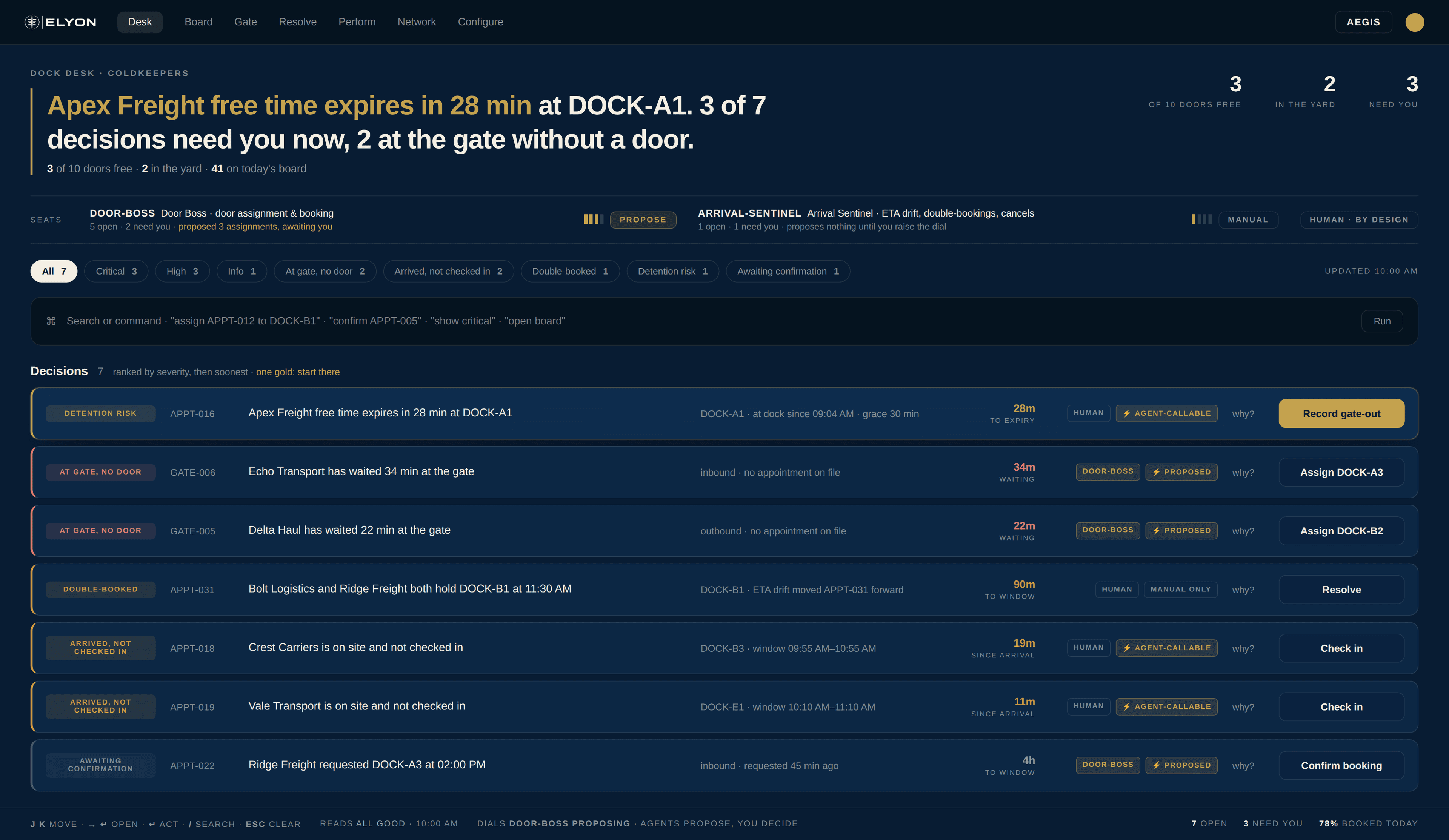
The dock desk: a ranked queue of decisions, each with its action.

You are never handed a number and left to work out what it means.

02The board

Drag it. It respects your rules.

Day and week views across every door. Drag a block to reschedule, drag across cells to hold. Per-door hours, capacity and ASRS clearance hold without being restated.
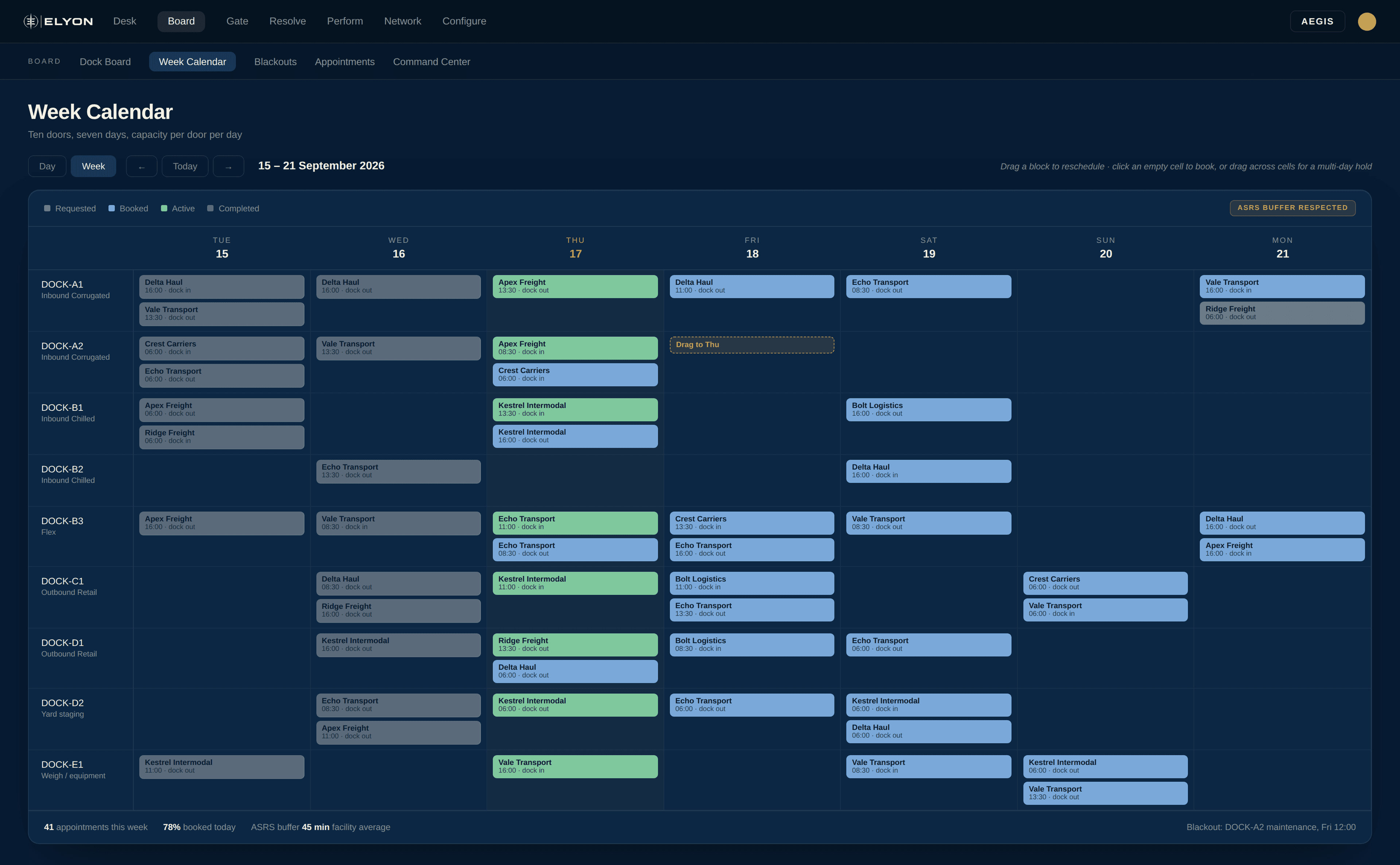
Week calendar: ten named doors across seven days, with a block mid-drag.

Doors carry operational names, so the board reads as your facility rather than a list of codes.

03The command center

Four screens became one.

Board, runway, gate queue and conflict queue on a single composed view. An idle door at 0% and a hammered one at 94% in the same glance.
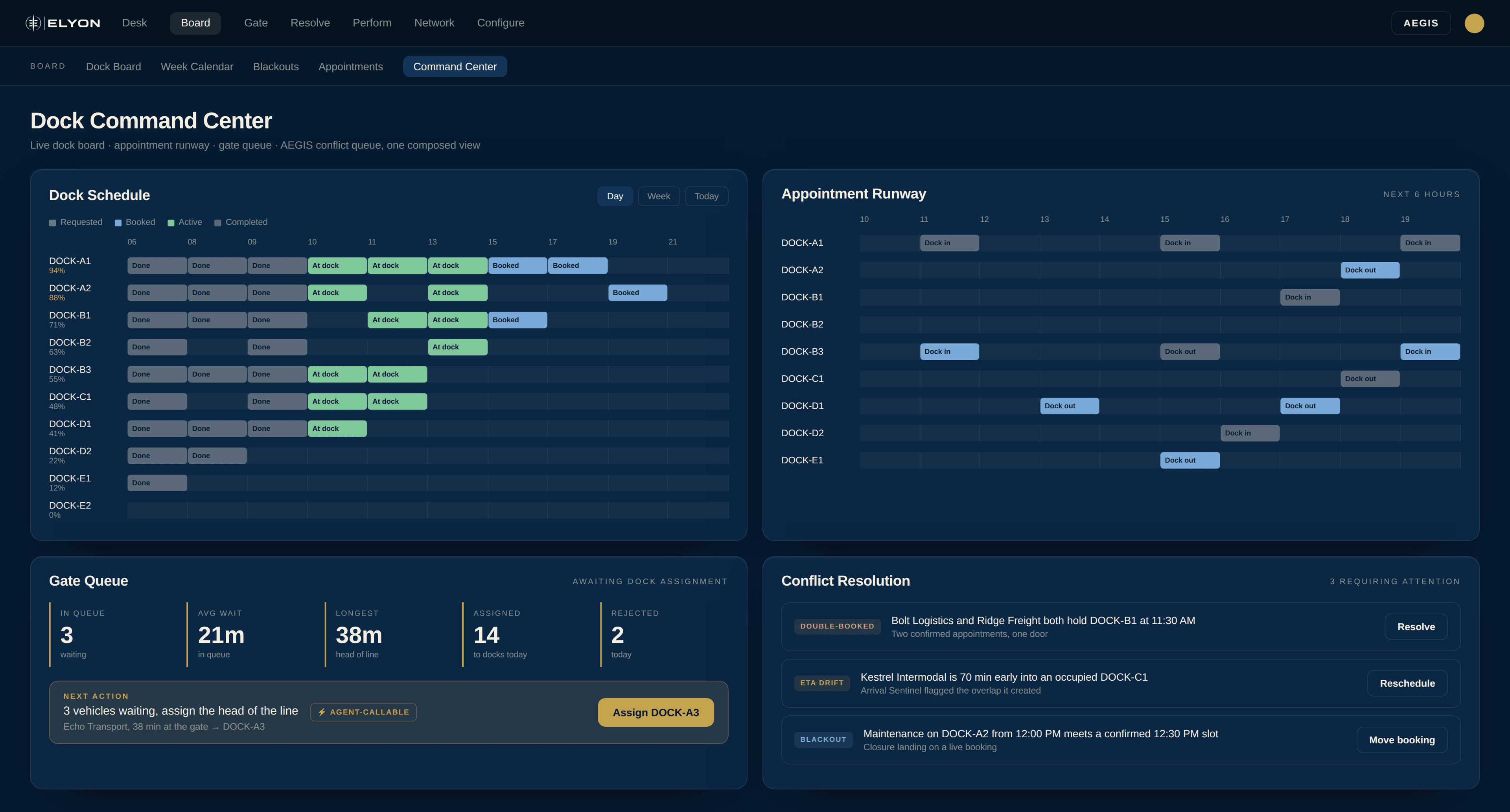
Command centre: dock schedule, runway, gate queue and conflicts on one view.

Your dock manager stands in front of one screen all shift instead of tabbing between four.

04The dials

Agents propose. You decide.

Every operational action is marked for who may run it, and every agent has an autonomy dial on the same screen. One code path, one audit trail, whoever takes it.
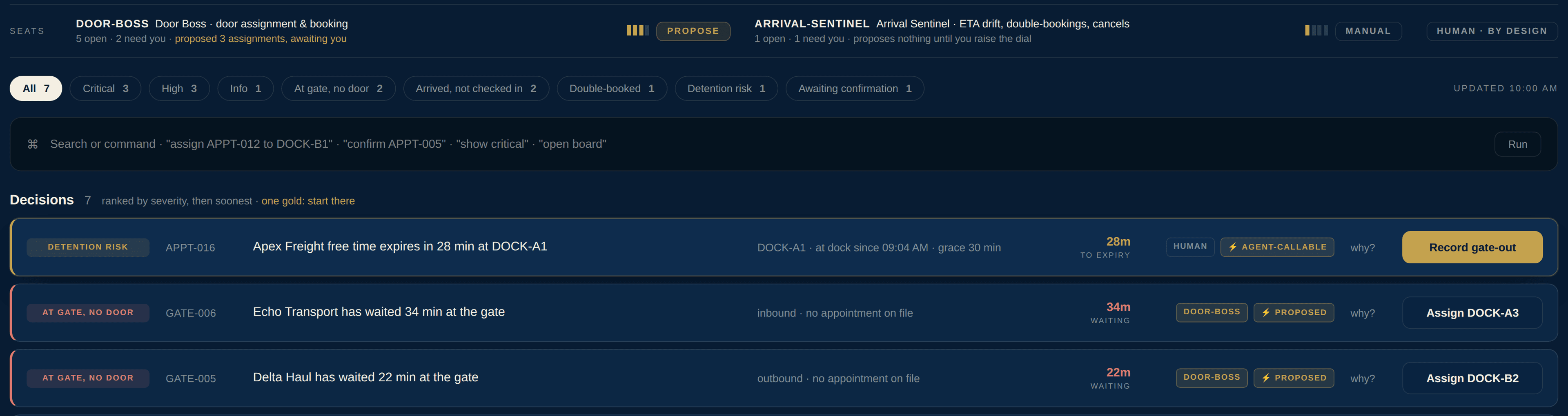
Seat row: Door Boss proposing, Arrival Sentinel on manual.

Door Boss proposing, Arrival Sentinel held back. Governance is a control on the screen, not a document in a drawer.

05What it schedules

Everything at your dock, not just the truck at the door.

Seven appointment types across six resource types, chosen independently. Your yard is not a spreadsheet taped to the side of the scheduling tool.

Dock
door
Yard
lane
Trailer
slot
Equip-
ment
Driver
None
Dock inbound
Dock outbound
Yard staging
Shipper pickup
Driver meeting
Equipment swap
Weigh station

Six-state lifecycle

01Proposed
02Confirmed
03Active
04Completed
05Cancelled
06No show

Duration is derived from start and end, never hand-entered.

What it actually is

A booking calendar answers the wrong question.

It tells you when the truck is coming. That is settled before the shift starts, and it is not what a dock manager spends the day on.

RequestedBookedArrivedAt gateAt dockLoadingGate-outDepartedA booking calendar stops hereWhere the day actually goesThe gate backs up.Which trailer goes where?Free time runs out.Nobody is watching the clock.Line 2 goes down.Four appointments must move.

Every one of those has a right answer given what the system already knows. In most facilities each one waits on a person noticing. Arrivo is the layer that notices.

06The five that differentiate

Most of a scheduler is table stakes. These five are not.

01
The same action your dispatcher clicks, an agent can call.
One code path, one audit trail. A property of the platform, not a roadmap item for a booking portal.
DispatcherAgentcompleteAppointmentOne audit trail
02
We warn you before the detention clock runs out.
Pre-alert 30 minutes before free time expires, with a 30-minute grace window. You find out while you can still move the trailer.
Free time remainingGrace 30⚡ 28 min to expiryPre-alert fires here
03
Your ASRS clearance is a scheduling rule, not a guess.
A buffer per door, tuned to how long your automated storage needs to clear. A scheduler built for dry vans has no concept for it.
DOCK-A1 · ASRS bufferApex 09:00Echo 10:3045 min clearanceHeld, not overlapped
04
A risk score that tells you how much to trust it.
Every appointment scored for no-show risk, and told apart when the score rests on a prior rather than measured carrier history.
No-show risk · APPT-01618%Confidence: statistical priorConfidence: 94 measured runs
05
One gold row. Start there.
The queue ranks by severity then soonest and marks exactly one place to begin. Not a list of everything wrong.
Decisions · rankedStart here
07Feature set
Scheduling8
Live dock board, day and week
Drag to reschedule
Click or drag to book
Live utilization per door
Seven appointment types
Six resource types
Six-state lifecycle
Auto-derived duration
Gate and yard5
FIFO arrival queue
One-click dock assignment
Gate metrics
Detention pre-alerts
Yard lanes as real resources
Configuration6
Per-door capacity
Per-door operating hours
ASRS buffer
Named doors
Retire, do not delete
Blackout rules
Intelligence6
No-show risk scoring
Stated model confidence
Anomaly detection
Conflict queue
Agent-callable actions
AEGIS governance
Platform5
CSV export
Search and filter
Command palette
Light and dark
One of twelve modules

Next step

See it on your docks.

Ninety minutes on your facility: your doors, your appointment types, your ASRS clearance, your detention terms. You keep the configuration.

Arrivo is the ELYON dock and appointment scheduling module. Every capability here is live in the product today. No figure is a customer outcome.